# Changelog
## Version 0.0.3.5 - Kick & Leave Updated
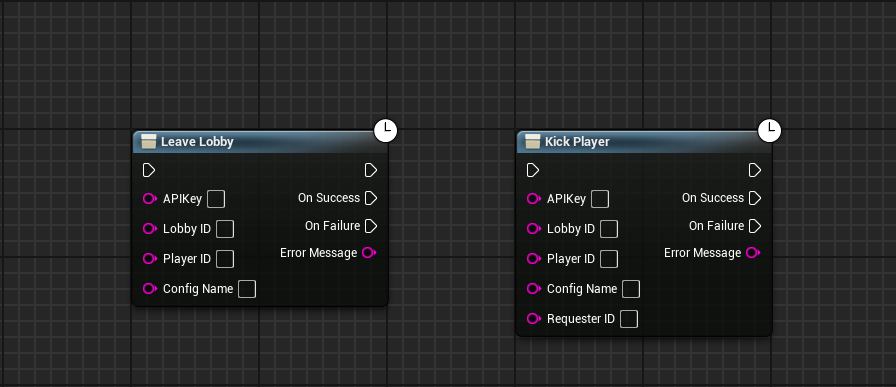
PCU was updated so that [Leave Lobby and Kick Player](https://duel-studios.gitbook.io/playflow-cloud-for-unreal/lobbies/leave-a-lobby-kick-a-player) are no longer unified nodes. PCU also had some under the hood changes to make it more resilient across engine versions without issues. This shouldn't effect anything other than how Unreal Processes the HTTP Requests across Engine Versions.
***
## Version 0.0.3.3 - Progress Upload
PCU was updated so that whenever you are uploading your build the progress is displayed to you now. Image below for reference of how it looks.
***
## Version 0.0.3.2 - QOL Love Part 1
PCU was updated so that "Set API Key" was changed to be "Settings" which takes you to the settings page to configure PCU with custom settings.
A new setting was added called "Keep Debug Files"
* Keep Debug Files will keep your .debug and .sym files in case you are needing to keep them for debugging purposes. By Default it is set to False and will always delete those files to save space on not only your computer but on Playflow Storage so your game servers will deploy faster.
A new setting was added called "Use Development Build"
* Use Development Build will build the game server using a Development Configuration and not a Shipping Configuration as default.
A new setting was added called "Build Name"
* Build Name allows you to set what the Build will be called and uploaded to Playflow with. The Default is well.. default. But there are other options such as "Beta", "Staging", "Development", and "Custom" - which opens a text box for you to input what you want it to be named. The Zip Files will also reflect this change.
A new setting was added called "Build Output Directory"
* Build Output Directory allows you to customise where you want to save the game server build & zip file. By default it is still Project/Saved/PlayflowBuilds
***
## Version 0.0.3.0 - Updates
PCU was updated to now use V3 of the Build Processing Tools from Playflow. Things work the same on the frontend, hit a button to upload your build and the rest happens on it's own. My goal with PCU is to always have things easy for developers to increase productivity and not have to fight the plugin.
* Updated the way that Builds are Processed using V3 from the Playflow docs
* This functions the same, but should help with faster uploads!
* Added a preprocessor for Unreal Engine 4 on the CurrentRequest->OnRequestProgress().BindLambda as part of the Lobby SSE Manager processing.
* On Unreal 4 it will use the above, but for Unreal 5+ it will use CurrentRequest->OnRequestProgress64().BindLambda. This is so that it works across those engine versions and will not be different or have issues with me supporting all the platforms.
* Adjusted the way we refer to Regions in the Plugin. For instance, EU North (Sweden) is now just Sweden.
* The region ids are the same and won't affect anything, this is purely so that if you process regions and display them all to your user, they will simply show up with the name of the location rather than Region and the location.
***
## Version 0.0.2.5 - SSE Error Fixes
PCU was updated to attempt to fix errors whenever we receive a Disconnection via the SSE Manager or another error. These weren't being broadcasted properly whenever we Bind/Assign the Events when we receive an SSE Error.
***
## Version 0.0.2.1 - Build and Push Updated
PCU was updated to now use Version2 of the API which uploads builds faster and allows for bigger sizes. Since Unreal Games are larger than most Unity games, we know this was going to be a hitch, but we hit it pretty early so decided to just get it updated.
Everything is kind of the same, but it makes an additional API Call to get a presigned URL that we then make our usual API call to in order to push it to Playflow. That's it.
***
## Version 0.0.2.0 - Build and Push
Playflow Cloud for Unreal now comes with a new feature called
{% content-ref url="toolbar/build-and-push" %}
[build-and-push](https://duel-studios.gitbook.io/playflow-cloud-for-unreal/toolbar/build-and-push)
{% endcontent-ref %}
This will automatically do everything for you to push your game server up onto Playflow Servers. This assumes that you have read the [Welcome](https://duel-studios.gitbook.io/playflow-cloud-for-unreal/welcome) and have a [Source Build of Unreal Engine](https://dev.epicgames.com/documentation/en-us/unreal-engine/building-unreal-engine-from-source).
***
## Version 0.0.1.0 - The Experiment Start
I am considering this the initial starting point. There will be a lot wrong probably, but I'm working through this. New things that we implement will appear in this changelog as well as appear in a group/category on the left-hand side or will appear under another page.